 SpeedyWebcheck
Who connects where – and where is the server?
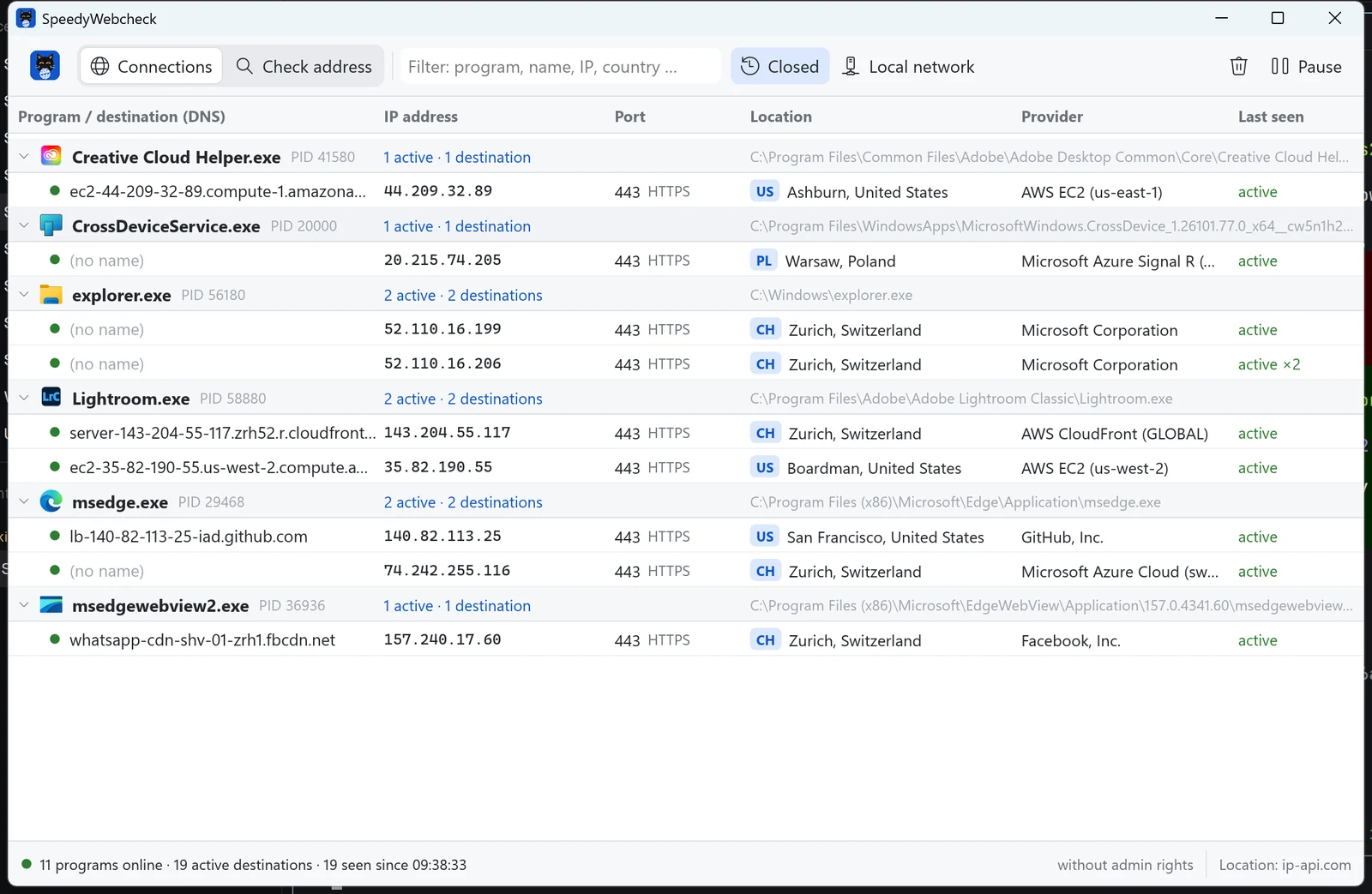
SpeedyWebcheck shows live which programs on your PC are talking to the internet: with DNS name, IP address, port, country, city and provider. Even connections that only lasted a moment stay visible. Named after a cat who doesn't miss a thing either.
- Only watches, blocks nothing
- No ads
- English & German
Features
Every program online
Each program with icon, path and process ID – and its destinations below. The list refreshes every second; identical destinations are grouped («active ×3»).
Nothing gets lost
As long as SpeedyWebcheck is open, closed connections stay in the list – with a timestamp. So you also see who only checked in for a moment.
DNS and IP
For every destination: IP address (IPv4 and IPv6), port with service name, reverse lookup (PTR) and – with admin rights – the name the program actually asked for.
Where is the server?
Country, region, city, provider and network (AS) of every address, plus whether it is a data center. One click opens the approximate location on a map.
Check an address
Enter any URL, host name or IP: SpeedyWebcheck shows the CNAME chain, all IP addresses with TTL, location and whether the server answers on the port – including internationalized domains.
Filter & pause
Filter by program, name, IP, country or provider. Press Space to freeze the list and read it calmly. Right-click copies IP or name.

Speedy sees everything. So does SpeedyWebcheck.
Yes, it's the same Speedy as in SpeedyPDF, SpeedyPad, SpeedyCapture and SpeedyVisual. This time he has the whole internet in his mouth. It was too big, so he only bit off the «www» for now.
Windows
AvailableSpeedyWebcheck is small, starts instantly and needs no account. It only watches – it never blocks or changes connections.
Download installer
SpeedyWebcheck-Setup-1.0.0.exe- Version1.0.0
- SystemWindows 10 / 11, 64-bit
- Size4.6 MB
- LanguagesEnglish, German
Checksum (SHA-256)
Lets you verify the download is unchanged (PowerShell: Get-FileHash).
275de582016d2898fa95a9f3e6a4e8d968e569bdb6c51f6f64f0eb0d26aeeff2Keyboard shortcuts
- Ctrl + 1 / 2Connections / Check address
- Ctrl + FFilter
- Ctrl + LEnter address
- SpacePause / resume list
- EscClear selection or filter
- Double-clickCheck destination as address
Good to know
- If Windows SmartScreen warns: «More info» → «Run anyway».
- Without admin rights, path and icon of services are missing; newer Windows versions also expose the DNS cache only to administrators. Menu → «Restart as administrator» shows everything.
- The location comes from ip-api.com and shows where the address is registered. With content delivery networks (Cloudflare, Akamai …) the answering server is often closer. Can be turned off in the menu.

Also named after Speedy
SpeedyPDF
The fast, lean PDF editor: highlight, annotate, reorder pages and merge PDFs. For Windows and Android.

Also named after Speedy
SpeedyPad
The lean text editor with tabs that stay – even unsaved ones. Highlighting for XML, CSV, batch, JSON and more. For Windows.

Also named after Speedy
SpeedyCapture
Screenshots with an editor: Print key, drag a region, draw arrows and text, blur confidential details. For Windows.

Also named after Speedy
SpeedyVisual
Flowcharts, org charts, timelines and mind maps in seconds – with templates and Excel import. For Windows.
Honestly: what goes online
SpeedyWebcheck collects no data about you and needs no account. To show locations, it sends the remote IP addresses to ip-api.com – nothing else. You can turn that off in the menu. Which programs you use never leaves your PC.